The General Controls provide access to various useful features that affect your character and your general experience with the client.
C++ Client

The General Controls appear with other filter options on the right sidebar below the Inventory and Combat Controls. Along with client widgets they can be moved vertically on the sidebar but cannot be disabled. You can click on  to see your character's Quest Log,
  to see the Options menu,
  to see the Help menu, and to Logout your character.
Options
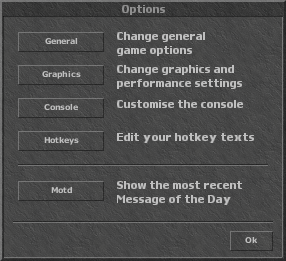

- : Check on or off 'Tibia Classic Control', 'Auto Chase Off', 'Show Names of Creatures', 'Show Textual Effects', 'Show Cooldown Bar'.
- : Check to enable 'Fullscreen', select from 'Available resolutions', or use 'Advanced settings:'
- 'Select graphics engine' (DirectX5, DirectX9, OpenGL), 'Set ambient light' from 0% to 100%, check to 'Show Light Effects', 'Don't Stretch/Shrink Game Window', use 'Windows Mouse Pointer', or 'Adjust framerate limit' from 10 to the maximum possible.
- : check to 'Show Info Messages in Console', 'Show Event Messages in Console', Show Status Messages in Console', 'Show Status Messages of Others in Console', 'Show Timestamp in Console', 'Show Levels in Console', Show Private Messages in Game Window'.
- : Assign a total of 36 hotkeys (F1-F12, ⇧ Shift+F1-⇧ Shift+F12, Ctrl+F1-Ctrl+F12). First select the key, then 'Edit hotkey text' in the field, chose if you want to check to 'Send automatically', or 'Edit hotkey object'
- : 'Message of the Day' is either a special message about an event something new in the game, or a random hint.
Help
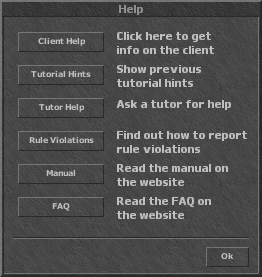

- : Turns the pointer into a magnifying glass, which can be hovered over parts of the client and hints popup explaining them.
- : Opens a menu with various intro tutorials you can select.
- : Opens the Help Channel.
- : Opens a window that says, 'To report violations against the Tibia Rules click on a character or a statement in the chat console. Select the appropriate "Report" option in the menu, then follow the instructions to specify your report.'
- : Opens the tibia.com Manual page in a browser, [1].
- : Opens the tibia.com FAQ page in a browser, [2].
Flash Client
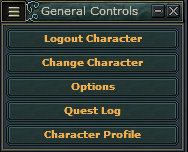
The General Controls, by default appear, in the right sidebar but can moved to any of the other three sidebars, can be minimized and maximized, or disabled through the Filters.
- Logout Character: Logs the character out of the game
- Change Character: Brings up a menu of your account's character. You can select one to re-login with.
- Options:
- General: General: check 'Tibia Classic Control'; Combat: check 'Auto Chase Off'; Options Management: 'Import Options' (disabled), 'Export Options', 'Reset Options' (disabled).
- Graphics: Light: check to 'Enable Light', set 'Ambient Brightness', 'Level Separator'; Game Window: check to 'Scale Game Window'; Frame Rate: set 'Maximum Frame Rate', and check to 'Show Frame Rate'.
- Status: Own Character in Game Window: select 'Classic', 'HUD', or 'Disabled' (unchecks all of next list) Style, check to 'Show Name', 'Show Health', 'Show Mana', 'Show Marks'; Other Creatures in Game Window: select 'Classic' or 'Disabled' (unchecks all of next list) Style, check to 'Show Name', 'Show Health', 'Show Marks'; Status Bar: select 'Default', 'Compact', 'Parallel', 'Large', or 'Disabled' Style, select to show your Level, Magic Level, or any Skill in the Progress Bar.
- Messages: Check 'Show Timestamps', 'Show Levels', click 'Restore Defaults'. For each Message type (Private Chat, Spell, Game Event, Look, Damage Dealt, Damage Received, Heal, Experience, Damage of Others, Heal of Others, Experience of Others, Status, Loot, NPC Trade, Hotkey/Action Bar Use) check which you want to see in the Game Window, Chat Console, and which of eight colours it should be in (red, orange, yellow, light green, dark green, cyan, light blue, dark blue, purple, mauve, gray, white).
- Hotkeys: Select one of eight Sets, turn the Mode to 'Chat On' Or 'Chat Off', click to 'Restore Defaults'. Pick one of 51 pre-purposed Hotkeys and 120 Action Bar Hotkeys and assign a 'First Key' and 'Second Key'. Click on any slot (with or without text). If there is text, it will become bold, click again and it becomes italic, then press the key/combo you want to assign. If there is no text in the slot when you first click, it will then say <empty>, click again and it becomes italic, then press the key/combo you want to assign it.
- Ignore List:
- Quest Log: Opens your Quest Log.
- Character Profile: A popup lists your character's Level, Experience, Hit Points, Mana, Capacity, Soul Points, Stamina, Magic Level, Fist Fighting, Axe Fighting, Club Fighting, Sword Fighting, Distance Fighting, Shielding, Fishing, Speed, and Food.
| Client Sections | |||||||
|---|---|---|---|---|---|---|---|
| Windows |
| ||||||
| Widgets |
| ||||||
| Miscellaneous | |||||||