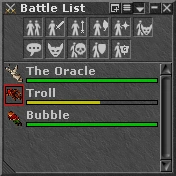
 The battle window displays a complete list of all Players, NPCs, and Creatures visible in your game window. It enables precise targeting when using Runes, eliminating the need for manual aiming with crosshairs. To cast a rune, simply click on the desired creature or player within the window after having used the rune.
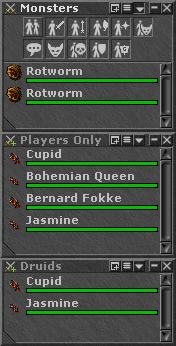
To better organize your gameplay experience, you can open additional battle lists by clicking on the small '+' icon  located on the title bar of your main battle list. This feature allows you to name and set unique filtering rules for each window by clicking on the three lines menu icon
  . For instance, you can create separate battle lists for Creatures, Skulled Players, specific Vocations, and even your own Guild Members. These features, including extra battle lists and vocational filters, were all introduced in the Summer 2019 Update.
You can configure your battle lists using the following filters:
- Hide Players
- Hide Knights
- Hide Paladins
- Hide Druids
- Hide Sorcerers
- Hide Summons
- Hide NPCs
- Hide Monsters
- Hide None-Skulled Players
- Hide Party Members
- Hide Members of Own Guild
If you right-click on a name in your battle window, a list of options appears:
- Attack
- Follow
- Look
- Message to <Player>*
- Add to VIP list*
- Ignore <Player>*
- Invite <Player> to party*
- Ask to inspect <Player>*
- Invite <Player> to inspect me*
- Report Name*
- Report Bot/Macro*
- Copy Name
Astericks (*) means the option will only be available if the target is a player.
| Client Sections | |||||||
|---|---|---|---|---|---|---|---|
| Windows | |||||||
| Widgets |
| ||||||
| Miscellaneous | |||||||