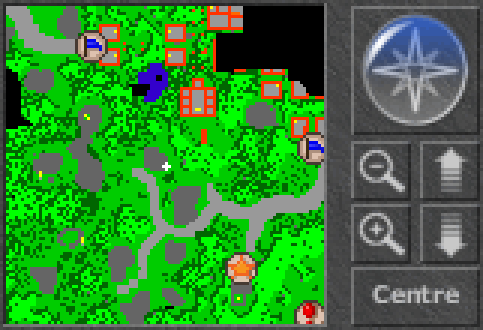
This is the small view of Tibia area which was discovered by your character. You can easily get familar in that area in which you are moving. Minimap is dynamically created by Tibia Client based on the view of the Game Window and adjacent area. The client renders pre-explored map data, typically from specialized PNG image files.
IMPORTANT:
For modern Tibia clients (Tibia 11 and 12), your explored minimap data is stored as a collection of PNG image files within the Tibia client's local data folder. These files are located at C:\Users\[Your_Username]\AppData\Local\Tibia\packages\Tibia\minimap (or more generally, %LOCALAPPDATA%\Tibia\packages\Tibia\minimap). Specifically, you'll find:
Minimap_Color_x_y_z.pngfiles, which contain the visual representation of the explored map areas.Minimap_WaypointCost_x_y_z.pngfiles, which store pathfinding information.minimapmarkers.bin, a binary file that stores all your custom minimap marks.
While the client now displays PNGs, the underlying map data is still derived from a similar structure to the older *.map files. When you install Tibia on another computer, this explored map data and your custom marks won't transfer automatically. Therefore, it's a smart move to back up the entire `minimap` folder (containing all these PNGs and the `minimapmarkers.bin` file) if you wish to retain your explored map and custom marks. For more in-depth information on the minimap file format, you can refer to the fansite dedicated to Maps on TibiaMaps.io Minimap File Format Guide.
Legend
Minimap consists of a small color rectangles that indicate type of any area field to which they correspond:
 - normal floor or road,
- - mountain or rock,
- - swamp,
- - grass or stone ground,
- - trees or bushes,
- - snow,
- - sand,
- - lava,
- - cave mud,
- - cave wall,
- - water,
- - wall,
- - ladder, hole, rope point, stairs or a teleporter (kinds of transport without using NPCs)
- - tar, void, inner cave walls, undiscovered area.

Your character's position is marked by a small white (or black, if you walk on snow) crosshair.
Actions
You can mark a certain positions on the Minimap by icons with some description. To do it, right click on the Minimap, then from the context menu select Set Mark command and set an icon in Edit Mark dialog window. Additionally you can give some short description to it. This description text will appear in small tooltip rectangle everytime you put your mouse pointer over this icon on the Minimap.
You can anytime edit these marks or delete it from the Minimap. To do it, right click on the selected icon and from the context menu select Edit Mark or Delete Mark command.

You can click on arrows on the Compass Rose to move the Minimap over all Tibia area. You can then center the Minimap at your character's position by clicking the center of the Compass Rose. The Minimap is automatically centered on your character's position when you move.


You can zoom in and out the view of Minimap to see more details or to see more overall Tibia area.


You can switch the Minimap to the higher or lower level of Tibia area by clicking these buttons.

You can center the Minimap at your character's position by clicking this button. Also, the Minimap is automatically centered on your character's position when you move.
Shortcut keys
- Alt+←, Alt+→, Alt+↑ or Alt+↓ - to move the Minimap (respectively) left, right, up or down over Tibia area.
- Alt+Page Up or Alt+Page Down - to switch the Minimap to the higher or lower level of area.
- Alt+Home or Alt+End - to zoom in or zoom out the Minimap. Alternatively, you can scroll with the mouse wheel to zoom in or out.
Maps of Tibia
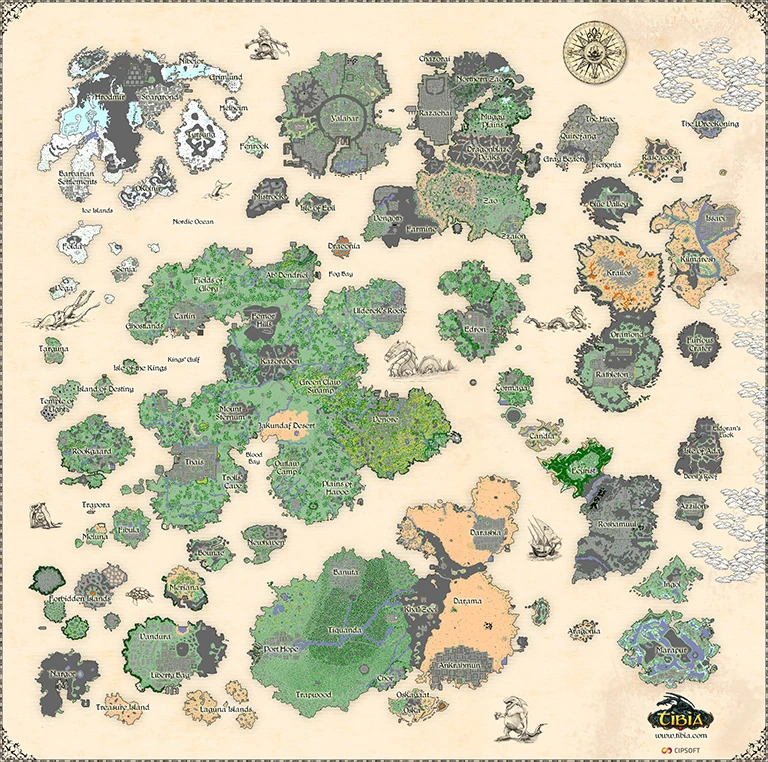
In the library at Tibia.com you can view a worldmap showing all the lands of Tibia, but also maps and some information of all the main cities and some common islands and areas in the wilderness.
Old Maps
You can see the evolution of the map by checking the history of the file above. Some older maps are also available on the gallery below.

.jpg "Map 7.2 (Small).jpg (88 KB)")


| Client Sections | |||||||
|---|---|---|---|---|---|---|---|
| Windows | |||||||
| Widgets |
| ||||||
| Miscellaneous | |||||||